Marvel Casino mobile and app guide: browser play on iPhone and Android
 Available in AU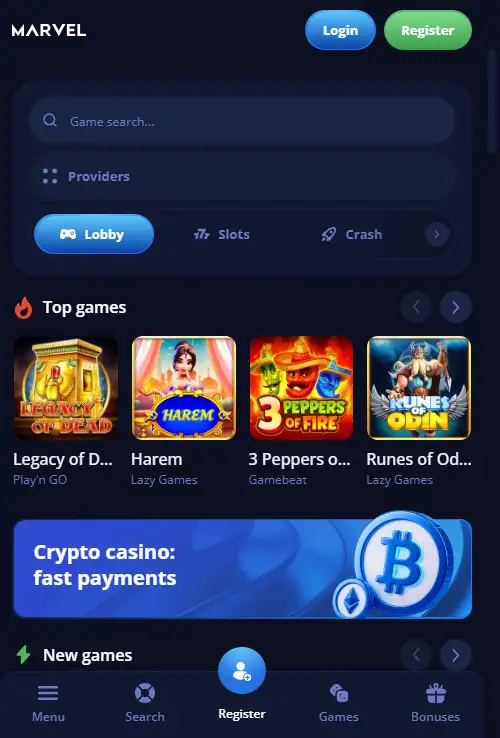
Table of Contents
- Marvel Casino is currently a browser-first mobile experience
- An Install button does not automatically mean an App Store or Google Play app
- The useful question is what you can do in the browser, not whether there is an app icon
- The mobile browser carries the same broad game-library logic to a smaller screen
- Live casino is the part of the mobile catalogue most sensitive to screen space
- Payment tasks are browser tasks too, including the Australian PayID cashier path
- Live chat gives the mobile site an in-browser support route
- Six checks prevent an install prompt from being confused with an unofficial app
- Browser play and the Install option
- What Marvel Casino mobile play looks like without a native app
Section element
iPhone and Android access
Marvel Casino is available through a mobile browser and the official site currently shows a “Get the app / Install” prompt. No dedicated native Marvel Casino app is listed for iPhone or Android. The Install prompt can represent website-install or web-app behaviour rather than an App Store or Google Play application. Google Play also contains an unrelated “Marvel Casino Quiz” app published by CYDR LTD, which is not an official WoT N.V. casino app. For practical use, the important mobile path is the responsive website: account access, the game catalogue, cashier functions and live chat can all be approached through the browser.
App answer first
Marvel Casino is currently a browser-first mobile experience
No dedicated iOS or Android app is currently listed, while the official site continues to expose an Install prompt. The product is therefore best described as mobile-browser access with optional website-install behaviour, not a listed native-store application.
| iPhone native app | Not currently listed |
|---|---|
| Android native app | Not currently listed |
| Browser use | Available |
| Official Install prompt | Visible on site |
| Games | 5,000+ advertised overall |
| Support | Live chat available |
Native app versus web install
An Install button does not automatically mean an App Store or Google Play app
The official Marvel Casino providers page currently includes the text “Get the app” and “Install”. That wording is meaningful because it shows the site is designed to offer an installation-style path. It is not enough on its own to identify the installed item as a native iOS or Android application distributed through an official store.
Marvel Casino is described as browser-based on mobile, with no dedicated native app listed. Google Play contains a product called “Marvel Casino Quiz” from CYDR LTD; its description is an educational quiz and the publisher does not match Marvel Casino operator WoT N.V. That unrelated listing is not a casino download route.
Naming rule
The current product is best described as the Marvel Casino mobile site or browser version. The official Install option is an install prompt or web-app style shortcut unless a store listing from WoT N.V. appears.
Mobile task map
The useful question is what you can do in the browser, not whether there is an app icon
Marvel’s mobile value comes from continuity with the main website. The current independent mobile reviews describe access through a phone browser, while Marvel’s official site exposes the same core navigation categories used across the desktop product. That means the practical mobile checklist is familiar: sign in, locate games, reach the cashier, open support and manage account tasks.
The browser-first setup also reduces the need to trust unofficial APK files, mirrors or third-party app listings. If a search result uses Marvel’s name but the publisher identity, domain or store listing does not match WoT N.V., it should not be treated as an official route.
The Marvel Casino Australia review keeps the wider brand and Australian context separate from this mobile-specific question.
Games on a phone
The mobile browser carries the same broad game-library logic to a smaller screen
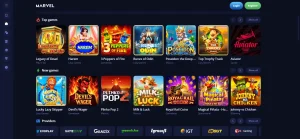
Marvel Casino advertises more than 5,000 games overall, and the mobile version supports access to the game catalogue through the browser. On a phone, however, the practical challenge is discovery. A 5,000+ library is too large to browse thumbnail by thumbnail, so search, provider filters and category navigation matter more than the headline count.
The game catalogue guide section covers providers and categories including pokies, table games, jackpots and crash or instant-style titles. On mobile, those categories remain useful as navigation shortcuts because they reduce scrolling and make it easier to return to a familiar provider.
Loading speed and control size can vary with the phone, browser and network connection. A slower experience on one device does not establish the same performance on another, so the relevant measure is how the site behaves on the actual device and connection being used.
Live dealer on mobile
Live casino is the part of the mobile catalogue most sensitive to screen space
Marvel’s live-casino section includes Evolution content. Live blackjack, roulette and baccarat combine streamed video with betting controls and table information, which can make them more demanding on a phone than a standard pokie.
The live casino on mobile section covers the main category-level facts, while specific tables, stakes and schedules depend on the current lobby. On a phone, readability and connection quality are as important as whether the provider is present.
Cashier access
Payment tasks are browser tasks too, including the Australian PayID cashier path
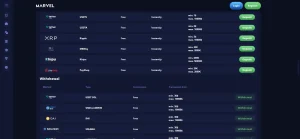
Marvel’s current official cashier lists PayID deposits for Australian dollars as free and instant, from A$5 to A$500. That is a current cashier fact, not a guarantee that every account will see the same method indefinitely, so the live cashier remains the final check before a transaction.
The mobile cashier and PayID payments guide separates deposits from withdrawals and explains the operator’s current processing rules. On mobile, the safest workflow is the same as on desktop: confirm the method, displayed limits and account details inside the current cashier rather than relying on an old saved view or a third-party banking list.
Because financial tasks can be interrupted by small-screen navigation, it is also useful to finish any account or verification request before treating a withdrawal as ready to process. The upcoming account access and registration guide covers the account-side tasks separately so they are not mixed into this app-intent page.
Support and account continuity
Live chat gives the mobile site an in-browser support route
Live chat is a Marvel Casino support channel, so a user does not need a native application simply to reach the main support route. That matters on mobile because the same browser session can hold the account interface, cashier and support entry point without switching to a separate app ecosystem.
The useful distinction is between continuity and native features. Browser access can provide the core site functions, but this section does not claim native-app features such as push notifications, Face ID integration or store-managed updates because no Marvel Casino native app is currently listed.
If the site’s Install prompt creates a home-screen shortcut, that can make return access feel app-like while still being website-based. The label or icon on the phone should not be used as proof that the software came from Apple or Google.
Safe navigation checklist
Six checks prevent an install prompt from being confused with an unofficial app
Use marvelcasino.games as the brand reference rather than a search-result mirror or APK page.
If a store listing appears, compare its developer or publisher identity with WoT N.V. before treating it as official.
An Install prompt inside the browser can create an app-like shortcut without being an App Store or Google Play release.
APK files, mirror domains and third-party installers are not needed for the browser-based mobile route.
A genuine native store app would need to show a publisher identity and official-site link consistent with the casino operator.
Check games, live tables, cashier and support on the device you actually use rather than judging mobile quality from an app icon alone.
Mobile access
Browser play and the Install option
Marvel Casino supports mobile-browser use and displays an Install option on the website. No dedicated native iOS or Android app is listed, so the Install control should not be treated as proof of an App Store or Google Play application.
Mobile decision
What Marvel Casino mobile play looks like without a native app
Marvel Casino is best described today as a browser-first mobile casino rather than a listed native iPhone or Android app. The official site can show an Install prompt, but responsive web access remains the main mobile route, and an unrelated Google Play listing demonstrates why publisher identity matters. The mobile website covers the main tasks that have decision value: browsing the game catalogue, opening live casino, reaching the cashier, managing the account and using live chat. If an official native app appears later, the operator domain and store publisher should identify the same casino operator.
For everyday use, that browser-first setup means the same Marvel Casino account can be approached from a phone without relying on an APK, mirror domain or unrelated store listing.